


Summary
- ChatGPT and Google AI integration went live automatically on March 24, 2026 (5.6M stores)
- Sidekick AI assistant writes code, and builds custom apps
- Rollouts Run free A/B tests with Rollouts — stop paying for VWO
- Bundle analytics show which product combinations are actually driving sales
- Availability limitations: Collective and Shop Pay Installments not available in all markets
⏱️ Reading time: 8 minutes
Shopify Winter 2026 marks a real shift in ecommerce. Customers no longer discover products only by searching Google and landing on your site. ChatGPT, Google AI, and similar platforms are now part of the shopping journey. That's what makes Shopify's Winter 2026 Editions — packed with 150+ updates — less of a technical release and more of a direct sales opportunity.
The ChatGPT Shopify integration sits at the center of this shift. Customers are now discovering, evaluating, and in some cases starting the purchase process inside AI platforms — before they ever reach your website. Traffic still exists, but the customer journey has changed.
So the real question here isn't about learning each new feature one by one. It's about how ready your store is for this new landscape. Your product descriptions, content structure, and how well AI "understands" your store directly affect your visibility and conversions.
Some Shopify 2026features are still in beta and rolling out gradually. We tested what's available, analyzed real store data, and focused on what's actually working.
Whether you're running a $30K/month store or just getting started — this guide covers what's changed, which features will move the needle, and where to focus starting today.
New to Shopify? Start with our What is Shopify and How Does It Work? guide first.
5 GAME-CHANGING UPDATES IN SHOPIFY 2026
- Sell Inside AI Platforms
Customers can now discover and buy your products directly inside ChatGPT, Google AI, and Copilot. For the first time in history, your Shopify store is fully integrated with AI platforms. When someone asks ChatGPT "recommend a coffee maker under $50," your products can show up right there. On Google AI Mode and Copilot, they can even complete the purchase without leaving the platform.
- Sidekick Writes Code
The AI assistant now builds custom apps, generates visuals, and surfaces proactive recommendations — without you asking. - Test Before You Publish
A/B testing and AI simulation let you see results before exposing changes to real customers. - Smarter Product Bundles
Analyze which combinations actually drive sales. 86% of stores see higher average order value with bundles. - One Dashboard, Multiple Markets
Manage B2B, retail, and international sales from a single Shopify admin.
Looked at individually, these feel like features. Viewed together, they show something bigger: Shopify is turning your store from a website into a system.
1. CHATGPT AND GOOGLE AI: MAKE YOUR STORE VISIBLE WHERE CUSTOMERS ARE
This is the most important update in this release — and not because of the new features themselves. Because of where customers now begin their shopping journey.
Before, a customer would search on Google, land on your site, and browse your products. Now, that same customer starts by asking a question inside ChatGPT. Or sees a direct recommendation inside Google AI.
Customers are no longer searching for you. You're showing up in front of them.
This changes two things:
SEO alone is no longer enough.
Your content needs to be understood correctly by AI.
Went Live Automatically on March 24, 2026
Shopify Agentic Storefronts activated automatically for 5.6 million stores on March 24, 2026.Your store is most likely already visible inside ChatGPT, Google AI Mode, Microsoft Copilot, and Gemini.

Platform-by-Platform Breakdown
Each platform handles the purchase process differently. Here's the full comparison:
| Platform | Discovery | Checkout | Control | Extra Fee (2026) | Users |
|---|---|---|---|---|---|
| ChatGPT | On your store (required) | None | None (4% fee removed) | 880M+ | |
| Google AI Mode | Inside AI / On your store | Your choice | None | 75M+ daily | |
| Microsoft Copilot | Inside AI / On your store | Your choice | None | Active | |
| Google Gemini | TBA | TBA | TBA | Beta |
Source: Shopify Help Center, Shopify Changelog
On ChatGPT:
- Customer discovers your product
- Gets redirected to your store when ready to buy
- Purchase is completed on your site
On Google AI Mode and Copilot:
- Customer discovers your product
- Can pay directly inside the AI OR get redirected to your store
- You decide which option to offer
Go to Settings → Sales Channels → Agentic Storefronts to control each platform separately.
We tested this over the last two months across a furniture store in the US and a medical practice store. We observed conversion rates between 18–23% from ChatGPT traffic. The biggest difference came down to product description quality and Knowledge Base completion rate.
Pricing
ChatGPT: The 4% OpenAI fee was removed on March 4, 2026. Only your standard Shopify transaction fees apply.
Google AI Mode and Copilot: No additional platform fee for now. Standard Shopify transaction fees only.
⚠️ Important: Keep in mind that Google and Copilot may introduce fees in the future. Follow Shopify Newsroom for official announcements.
Source: Shopify Pricing
How to Prepare Your Store
Agentic Storefronts activate automatically — but what actually makes the difference is data quality. So the first step is setting up the Knowledge Base properly.
Knowledge Base The Knowledge Base app is free to install from the Shopify App Store. It helps AI platforms understand your store, your products, and your brand. When AI platforms talk about your store, this is the data they reference.
These areas are especially critical:
- Product descriptions written in natural, conversational language
- Your brand story
- Shipping and return policies
- Customer reviews and real usage scenarios
The cleaner and clearer this information is, the more likely your products are to be recommended inside AI conversations.
New to Shopify? Our Shopify Store Setup: 9 Steps to Start Selling Fast rehberimiz guide can help you get the basics in place first.
→ How to Make Your Shopify Store Visible on ChatGPT and Google AI — Full Setup Guide (Coming soon)

2. SIDEKICK: FROM Q&A BOT TO BUSINESS PARTNER
Sidekick is no longer just a reporting tool. It behaves more like a consultant running in the background — all the time.
Before, you asked questions and it answered. Now it surfaces recommendations before you even ask. It tells you which product's performance is dropping, which hours drive the most sales, and which changes might actually work.
And it doesn't stop at data. It can set up basic automations, build small custom apps, and make changes on the theme side.
For stores without a technical team, that's a significant advantage.
Custom App Development
Even without a developer, Sidekick can build simple apps for you.
You say: "Build an app that sends me a WhatsApp message when stock drops below 10." Five minutes later, it's running.
Voice Commands on Mobile
While driving: "Sidekick, how many orders came in today?"
Sidekick: "23 orders today, totaling $1,240."
Language Support: Sidekick went live in 20 languages in April 2025, including full English support.It automatically adapts based on your store's language settings.
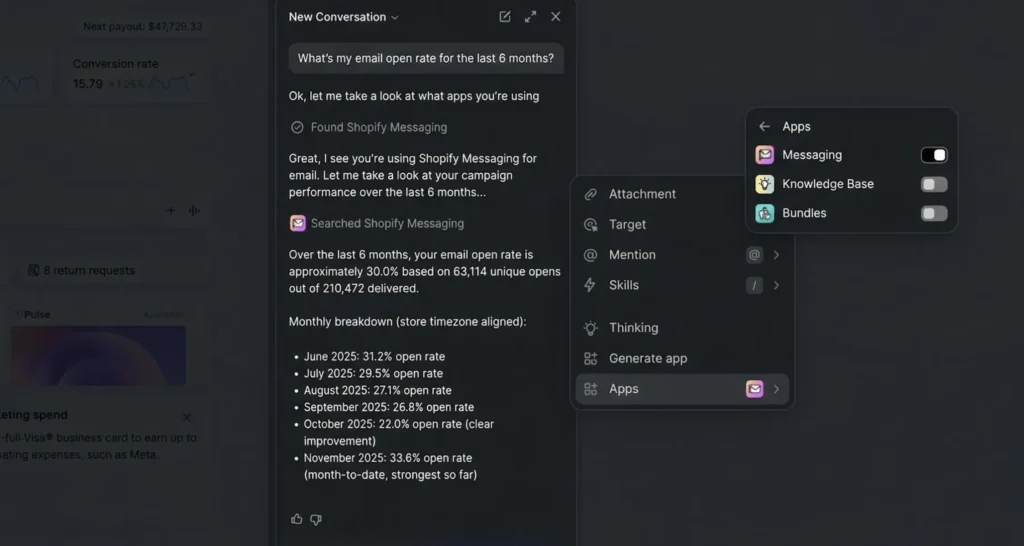
Theme Editing and Visual Creation
Say "add a rounded button to the homepage" and Sidekick updates your theme settings instantly.
Say "create a summer sale banner with a beach theme" and the visual is ready in seconds.
Automations
You know Shopify Flow exists — but most store owners never set it up because it feels complicated.
Sidekick fixes that. Say "send a thank-you SMS when an order exceeds $50" and Sidekick builds the Flow automation for you.
Sidekick is active on all plans. Click the purple glasses icon in the bottom right corner of your admin panel to get started.
→ How to Use Shopify Sidekick — Full Guide (Coming soon)
3. ROLLOUTS AND SIMGYM: TEST BEFORE YOU PUBLISH
One of the biggest problems in ecommerce is this:
You make a change — but you only find out if it worked after it's already live.
Shopify is working to reduce that risk.
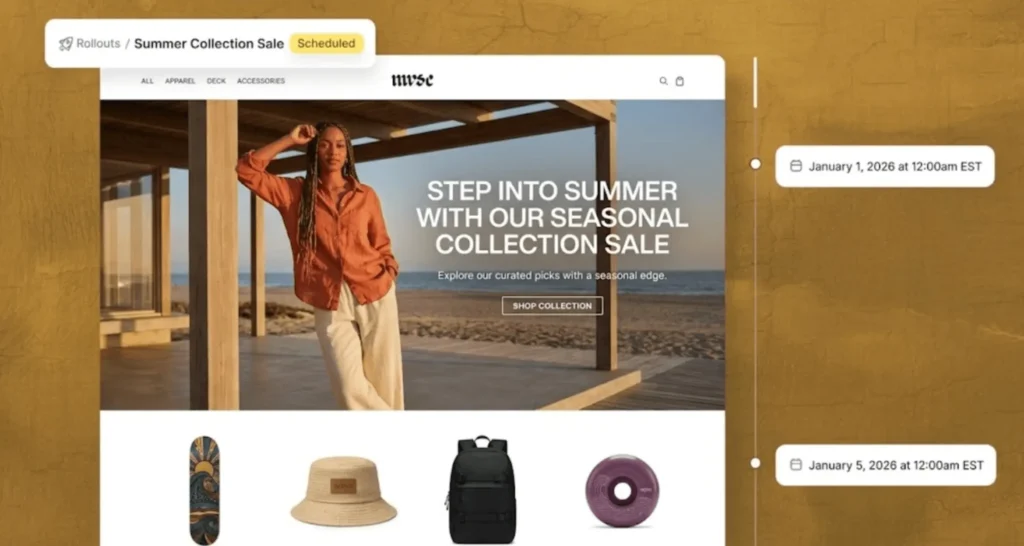
With Rollouts, you can now run A/B tests directly inside Shopify. Instead of pushing a change to all your visitors at once, you test it in a controlled way first.
SimGym goes one step further. It lets you simulate a change before it ever goes live. So questions like "what happens if I lower this price?" get answered with data — not guesswork.
Together, these two features shift decision-making away from gut feeling and toward evidence.
Rollouts: Native A/B Testing Inside Shopify
No third-party testing apps. No extra budget. A/B testing built right in.
Availability:
- Scheduling: Basic plan and above
- A/B testing: Advanced and Plus plans
- Currently in early access
For example, you can test two versions of your product page. Rollouts sends half your traffic to version A, half to version B. After one week, you see which one converted better.
SimGym: AI-Powered Simulation
SimGym lets you test changes before they go live. It uses AI agents trained on billions of real Shopify purchase data points.
AI Research Preview available on the Shopify App Store but with limited access.
Say you're thinking about dropping a price from $99 to $89. Ask SimGym: "How would this affect performance?"
AI response: "Sales could increase by 18% but profit margin drops 9%. Try $94 instead — sales still go up and margin stays protected."
→ How to Run A/B Tests with Shopify Rollouts (Coming soon)
4. ADVANCED BUNDLES AND ANALYTICS
Product bundles aren't new — but with Shopify Winter '26, tracking and managing them becomes meaningful for the first time.
You can now track bundle performance separately inside Shopify's native analytics. Which bundles are selling, which ones are actually converting — it's all clearly visible.
One thing to keep in mind when building bundles: don't just group random products together. Offer combinations that complete a need or a scenario for the customer.
→ How to Sell Product Bundles on Shopify — Increase Average Order Value by 86% (Coming soon)
5. SHOP APP: 150 MILLION USERS
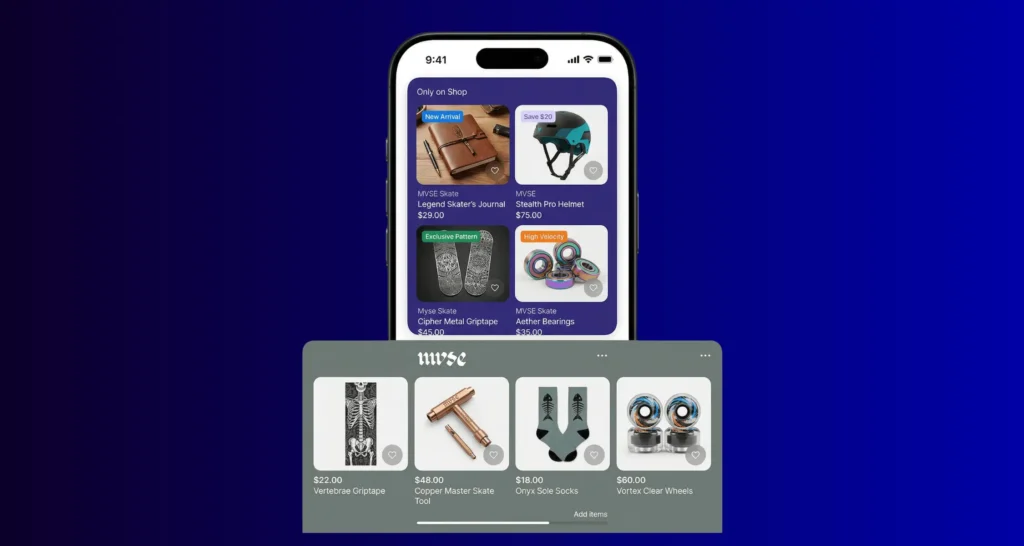
The Shop app is evolving from a order-tracking tool into a full shopping and discovery platform. More than 150 million users are now discovering products directly inside Shop — without searching on Google or scrolling through social media.
Dynamic Storefronts: Every user sees a different Shop. Someone browsing leather jackets gets shown leather accessories.
Deals Feed: Running a Black Friday sale? Your store automatically appears in the "Deals" tab inside Shop.
Video Content: Product videos drive directly to purchase.
What to do:
- Activate your Shop integration
- Upload high-quality images and videos
- Plan your campaigns so they surface in the Shop feed
→ How to Stand Out on the Shop App (Coming soon)
6. MARKETS: B2B + INTERNATIONAL + RETAIL IN ONE PLACE
Managing international sales, B2B, and retail on Shopify was always possible — but fragmented.
With Shopify Winter '26, Markets becomes a centralized control hub.

WHAT SHOULD YOU DO NOW?
Right Now:
- Try Sidekick - it's already in your admin panel, bottom right corner. Click it, start experimenting.
- Review your product descriptions — write in natural, conversational language.
- Check your Agentic Storefronts settings – Settings → Sales Channels → Agentic Storefronts
- Install Knowledge Base — free on the App Store
- Choose your checkout model — for Google/Copilot: direct checkout or redirect?
Within 30 Days:
- Run your first A/B test — try two designs with Rollouts
- Set up an automation with Sidekick — use Flow to automate repetitive tasks
- Activate your Shop integration — is your profile complete? Do you have videos?
- Analyze your bundle performance — which packages are actually selling?
- Explore Markets — if you're selling internationally
Long Term:
The future of ecommerce is multi-channel. Your website still matters — but customers are now shopping inside AI conversations, social platforms, and marketplaces.
Prepare your product catalog, brand story, and infrastructure to work consistently across all channels.
CONCLUSION
Shopify Winter 2026 isn't really a feature update. It's a change in direction.
The question is no longer just about building a store or driving traffic. Where customers discover you — and how they evaluate you when they do — matters more than ever.
Ecommerce still completes on your site. But the starting point is no longer in your control.
The stores that win won't be the fastest to adapt.
They'll be the ones that truly understand what changed.
Shopify Store Optimization and Implementation
At Groway Digital, we help ecommerce brands in the US, Europe, and beyond implement Shopify Plus solutions and build growth strategies that actually work.
From applying Shopify's Winter 2026 updates to your store — technical implementation, conversion optimization, and everything in between — we've got you covered.
Get in touch for a free 30-minute consultation.
FREQUENTLY ASKED QUESTIONS
When was the Shopify Winter 2026 update released?
Shopify Winter 2026 Editions launched in December 2025. It includes 150+ new features and updates.
Can customers check out directly inside ChatGPT?
No. On ChatGPT, customers discover your products but complete the purchase on your store. Google AI Mode and Copilot, however, do offer a direct checkout option inside the AI platform.
Does Sidekick support languages other than English?
Yes. Sidekick went live in 20 languages in April 2025, including full English support.
Are these features available on all plans?
Most features are available on all plans. Sidekick is active across all plans. Rollouts is rolling out gradually — A/B testing requires Advanced or Plus. SimGym is available with limited access.
How do I prepare my store for these updates?
Start using Sidekick, install the Knowledge Base app, rewrite your product descriptions in natural conversational language, check your Agentic Storefronts settings, and activate your Shop integration.
